Row Sorting
This page describes how to get your grid data sorting.
Enable Sorting
Enable sorting for columns by setting the sortable column definition attribute. Then sort a column by clicking on the column header. To enable/disable sorting for all columns, set sorting in the default column definition.
grid!.getOptions().getDefaultColumnDefinition().setSortable(0)
The row sorting is enabled by default on all columns
Multi Column Sorting
It is possible to sort by multiple columns. The default action for multiple column sorting is for the user to hold down Shift while clicking the column header. To change the default action to use the Ctrl key (or Command key on Apple) set the grid option UseCtrlForMultiSort
grid!.getOptions().setUseCtrlForMultiSort(1)
Sorting Animation
To enable/disable animation of the rows after sorting, set grid option AnimateRows=true. By d
grid!.getOptions().setAnimateRows(1)
The row animation is disabled by default
Sorting Order
By default, the sorting order is as follows:
ascending -> descending -> none.
In other words, when you click a column that is not sorted, it will sort ascending. The next click will make it sort descending. Another click will remove the sort.
Sorting API
Sorting can be controlled via the Sorting API via the following methods:
BBjGridExWidget.setSortModel(GxClientSortModel model!): set the sorting for one or more columns at onceBBjGridExWidget.sortColumn(BBjString column!, BBjString direction!): set the sorting model for one column
The following example apply sorting for the CDNUMBER and the TITLE at once.
use ::BBjGridExWidget/BBjGridExWidget.bbj::BBjGridExWidgetuse ::BBjGridExWidget/GxClientModels.bbj::GxClientSortModeluse ::BBjGridExWidget/GxColumns.bbj::GxColumnuse com.basiscomponents.db.ResultSetuse com.basiscomponents.bc.SqlQueryBCdeclare auto BBjTopLevelWindow wnd!declare BBjGridExWidget grid!wnd! = BBjAPI().openSysGui("X0").addWindow(10,10,800,600,"Rows Sorting Demo")wnd!.setCallback(BBjAPI.ON_CLOSE,"byebye")gosub mainprocess_eventsmain: declare SqlQueryBC sbc! declare ResultSet rs! sbc! = new SqlQueryBC(BBjAPI().getJDBCConnection("CDStore")) rs! = sbc!.retrieve("SELECT * FROM CDINVENTORY") grid! = new BBjGridExWidget(wnd!,100,0,0,800,600) grid!.setData(rs!) model! = new GxClientSortModel() model!.add("CDNUMBER", GxColumn.SORT_DESC()) model!.add("TITLE", GxColumn.SORT_ASC()) grid!.setSortModel(model!)returnbyebye:bye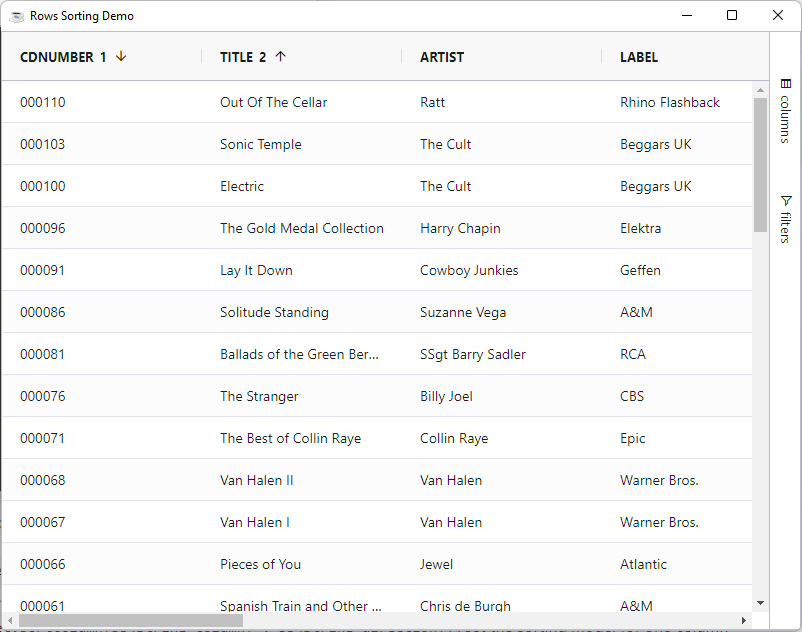
To Query the sorting state (::BBjGridExWidget/GxState.bbj::GxState) in the grid use the BBjGridExWidget::getState() method. The state contains all properties related to the grid state including the sorting model
- grid-state.bbj
- grid-state.json
use ::BBjGridExWidget/GxState.bbj::GxStatedeclare GxState state! state! = grid!.getState()rem returns a parsable JSON string? state!.toString(){
"columns":[
{
"colId":"CDNUMBER",
"width":200,
"hide":false,
"pinned":null,
"sort":"asc",
"sortIndex":1,
"aggFunc":null,
"rowGroup":false,
"rowGroupIndex":null,
"pivot":false,
"pivotIndex":null,
"flex":null
},
{
"colId":"ARTIST",
"width":200,
"hide":false,
"pinned":null,
"sort":"desc",
"sortIndex":0,
"aggFunc":null,
"rowGroup":false,
"rowGroupIndex":null,
"pivot":false,
"pivotIndex":null,
"flex":null
},
{
"colId":"TITLE",
"width":200,
"hide":false,
"pinned":null,
"sort":null,
"sortIndex":null,
"aggFunc":null,
"rowGroup":false,
"rowGroupIndex":null,
"pivot":false,
"pivotIndex":null,
"flex":null
},
...
],
"groups":[
...
...
],
"filters":{
...
}
}
Custom Comparator
By default, the grid sorts rows using its built-in comparators (alphabetical for strings, numeric for numbers, etc.). String sorting is case-sensitive, so "Alex" and "alex" land far apart in the sorted output.
To override this behavior on a per-column basis, assign a ComparatorExpression to the column. The expression is a JavaScript snippet that receives the following variables:
| Variable | Description |
|---|---|
valueA | The value in the first row being compared |
valueB | The value in the second row being compared |
nodeA | The RowNode of the first row |
nodeB | The RowNode of the second row |
isDescending | true when the user is sorting descending |
The expression should return:
0when the values are equal- a positive number when
valueAshould come aftervalueB - a negative number when
valueAshould come beforevalueB
Case-Insensitive Sorting
A ready-made GxExpressionCaseInsensitiveComparator is provided for the common case of sorting strings without regard to capitalization. Values like "Alex" and "alex" are treated as equal during comparison.
use ::BBjGridExWidget/GxExpressions.bbj::GxExpressionCaseInsensitiveComparator

column! = grid!.getColumn("ARTIST")
column!.setComparatorExpression(new GxExpressionCaseInsensitiveComparator())
Custom Comparator Expression
For any other ordering, wrap a JavaScript snippet in GxExpression. The example below sorts a column by string length instead of alphabetically:
use ::BBjGridExWidget/GxExpressions.bbj::GxExpression

column! = grid!.getColumn("TITLE")
column!.setComparatorExpression(new GxExpression("return String(valueA).length - String(valueB).length;"))
Comparators run once per pairwise comparison during a sort, which can be many times for a large dataset. Keep the expression body short and avoid allocating new strings inside it when possible.
Accented sort
By default sorting doesn't take into consideration locale specific characters, if you need to make your sort locale specific you can configure this by setting the grid option AccentedSort = true
grid!.getOptions().setAccentedSort(1)
Using this feature is more expensive, if you need to sort a very large amount of data, you might find that this causes the sort to be noticeably slower.